
|
|
|
|
Before you start building the discussion board, please make sure that:
You have a running database server and web server.
You have installed the required extensions for
completing this tutorial:
The MX Kollection 3 bundle, or, alternatively:
· MX
Send E-mail
· MX
Form Validation
· MX
User Login
· MX
Query Builder
You have a correctly defined Dreamweaver site.
You set up the database provided with this tutorial and create a connection to it.
For more instructions about setting up your site, consult the Getting Started help file that comes with MX Kollection 3. It can be accessed in Dreamweaver from Help -> InterAKT -> Getting Started.
The discussion board will store its information in a database having
the following table and column structure:
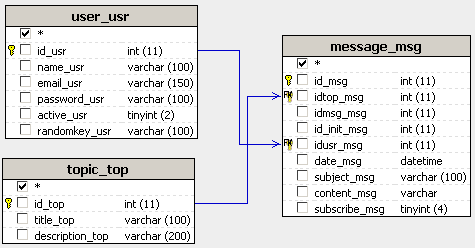
Note: The database diagram in the image above was built with MX Query Builder (also referred as QuB) to better illustrate the database structure. You do not need to build it in order to complete this tutorial.
Here are the database tables and their columns:
topic_top - stores information
regarding the main discussion topics:
· id_top
- the primary key for the topics table. No two topics can have the same
ID.
· title_top
- the topic's title (e.g. Economy and Stock Markets).
· description_top
- a text description of the topic's subject. Will be displayed below the
topic title
message_msg - stores
all messages posted on the site, for all topics. The table's columns have
the following meaning:
· id_msg
- the primary key
for the messages table. Used to uniquely identify a message.
· idtop_msg
- the foreign key that connects to the associated topic. Through this
column, a message is marked as belonging to a topic.
· idmsg_msg
- self foreign key that stores the ID of the parent message. It is used
when posting a reply to link the current message and the message that
is being replied to.
· id_init_msg
- also a self foreign key used when the message is a reply. It is used
to store the ID of the first message in the reply chain.
· idusr_msg
- foreign key to the user's table, stores the ID for the user that posted
the message.
· date_msg
- the date when the message was posted.
· subject_msg
- the message subject. If a reply, it should be Re: and the old subject.
· content_msg
- the message's main text.
· subscribe_msg
- stores if the user is subscribed to this message thread or not (1/0).
user_usr - stores
the user data: e-mail, password etc.
· id_usr
- the primary key
for the user table. No two users can have the same ID.
· name_usr
- the user account. Used to login on the site.
· email_usr
- the email address of the user (john_smith@noplace.org).
· password_usr
- stores the user's password.
· active_usr
- a boolean variable (Y/N) based on whether the user account is active
or not.
· randomkey_usr
- stores a randomly generated code used for user activation.
To set up your application, follow these steps:
You can find the scripts needed to create an identical table structure inside the downloaded package, in the \tutorials\Discussion Board\db\ folder, as an sql or mdb file, depending on the database server you intend to use. Execute the sql script in your database server management software (e.g. PHPMyAdmin, Microsoft Access etc.).
Open Dreamweaver
and create the following folder and file structure for your site. You
can create it easily by unpacking the zip file
corresponding to your server model
from \tutorials\Discussion Board\ in your site
root folder:

Open the index page
and create a new connection named connBoard
and configure it to connect to your newly created database.

Starting with the following topic, you will learn how to display and add messages and topics.