Display random
image
In this tutorial topic you will modify the default.php
page to show a random picture each time the page is reloaded.
- Open the default.php page.
- Create a new recordset. This will retrieve from the
table all the image details, and
will also make use of the SQL function RAND()
to associate to each entry a random number. Then, the entire recordset
will be ordered by the random number that was generated. This ensures
that all images in the table get an equal chance of being displayed.
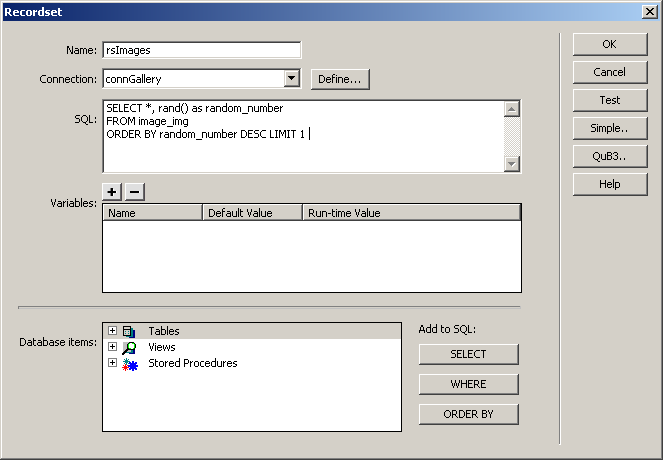
- To create the recordset, click on the button of the . Since
the SQL query is more complex than the
interface can handle, click on the
button. Fill in the dialog box options as follows.
- In the Name text
field enter the recordset's name: rsImages.
- In the Connection
drop-down menu, select the database connection defined at the beginning
of this tutorial (connGallery).
- In the SQL text
area you must enter the code that will retrieve the records. Copy and
paste the code below:
SELECT *, rand() as random_number
FROM image_img
ORDER BY random_number DESC LIMIT 1
- Click on to
add the recordset to the page.
Apply the
server behavior
using the rsImages recordset (as described
in the Delete image
page).
You should now be able to load the page in a browser
and see a random image from your database.
You can refresh the page a few times to see different images.
