
|
|
|
|
The User Interface persistence is one of the features in MX Kollection 3 that allows interfaces remember settings that have already been set. This way, repeating the same action is much faster, because settings are automatically filled by the persistence.
You can turn persistence on or off, as you need it, from the InterAKT Control Panel, the User interface persistence and database caching entry.
MX Kollection 3 saves persistence data in an XML file that is stored in Dreamweaver's Configuration folder. On PC systems, running windows, you can find this file in <system drive>\Documents and Settings\<current user>\Application Data\Macromedia\Dreamweaver MX\Configuration\persistence.xml. On MacOS, the file is located in [MAC HDD] /Users/[user]/Library/Application Support/Macromedia/ Dreamweaver MX 2004/Configuration.
This file is generated if User Interface Persistence is enabled and at least one element that stores data in the file has been used. The xml file stores the following elements:
as a first level tag, the persistence version. This is useful as when switching different versions of persistence (e.g. when you upgrade the product). different options might be enabled.
as a second level, the server model is saved as a node
on the third level node, the user interface that generated the data is recorded
actual data is stored as node tags on the fourth level.
A sample structure of the persistence.xml
file can be seen below:
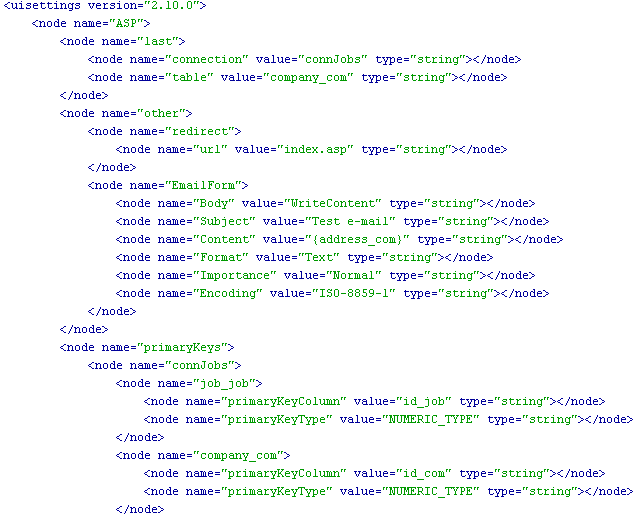
Through the persistence.xml file, for each server model the following information is saved:
The last connection and table used.
The last settings used in a server behavior or wizard : database connections and primary keys, as well as primary keys types, regardless of the site they've been used on.
For each connection, the names of the tables involved are stored. For each table, column properties (label, display as and submit as elements) are saved as well.
Some server behaviors and wizards share part of the information stored in the user interface persistence (e.g. between the NeXTensio List and Form, between the Transaction Engine Wizards and NeXTensio etc). The only condition to meet in order to achieve this sharing is to use the same database connection.
Default values for the form fields are stored as well, even if the form
field uses a recordset. When the same connection is used, the user interface
persistence will also generate the recordsets associated to form fields.
(e.g. for a dynamic menu that uses a recordset, if the same field on the
same database connection has been already set up once, the recordset
providing the default values is automatically generated).