User interface persistence and database caching

One of the most important features added in MX Kollection 3 is the user interface persistence - an improvement that makes the Dreamweaver interfaces smart by remembering your selections. Thus, when configuring a specific form, the user interface persistence layer will memorize your field settings, and subsequent usages of the same table will require no more configuration from your side.

To improve performance when working with database related user interfaces, MX Kollection 3 uses a special component called the Database Cacher, which stores meta-data regarding the database structure immediately after the first use in a MX Kollection 3 interface. This stores locally information regarding the table names, table primary keys and field types. This way, when another user interface requests meta information regarding the tables, it is retrieved from the local cache without having to make another call to the database server.

In the InterAKT Control Panel, there is a component that allows configuring the Database Cacher.

The dialog box is similar to the image below:
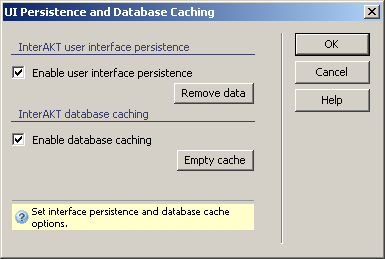


The User Interface is divided into two areas, depending on the purpose of the enclosed options: The UI persistence or the Database caching.

In this dialog box, the elements have the following role:

  1. The Enable user interface persistence checkbox determines whether the user interfaces will have persistence or not. When checked, persistence for the user interfaces is active, and when un-checked, it is not.
  2. The Remove data button clears all the persistence data accumulated.
  3. The Enable database caching checkbox determines whether meta information regarding the database tables is stored locally or not. Checked means that information is stored.
  4. The Empty cache button clears all meta information stored until that moment by the database cacher.
  5. The three buttons on the right of the interface offer you the next functionalities:
    · Click
    OK when you are done configuring the dialog box.
    · Click Cancel to exit without changing the user interface persistence and database caching settings.
    · The Help button takes you to this help page.
 
When working with the ColdFusion server model, two additional fields need to be filled in: User name and Password. This is the RDS login information. It is used in order to allow the MX Kollection 3 extension to connect to the ColdFusion server, and perform the specific actions (e.g. the retrieval and caching of table information etc.).


If the RDS account information (the user name and password) cannot be provided, or is incorrect, the database caching will not work. However, it will not affect the user interface persistence in any way.