
|
|
|
|
If in the NeXTensio list more than one element has been selected for editing (by checking multiple checkboxes) or if you want to insert more records at the same time (by choosing the number of records to add from the drop-down menu located next to the Add new button), more than one set of form elements will be displayed, allowing you to work on the entire number of records selected at once. Changes that occur on all records are submitted at the push of one button.
Each record to be inserted or updated contains the same fields, in the
same order, and are identified by a title. There is only one set of buttons
that process the entire page. Depending on the option you selected in
the Display as grid drop-down menu from the
Create NeXTensio Form Wizard
(last step), the multiple insert form can look like in the following images:
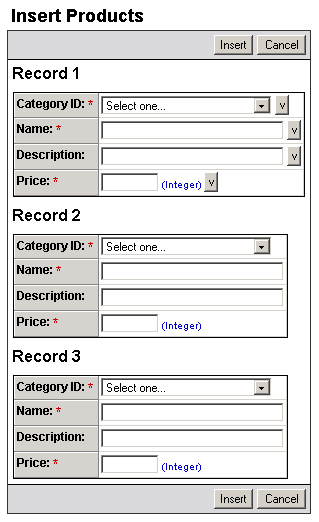
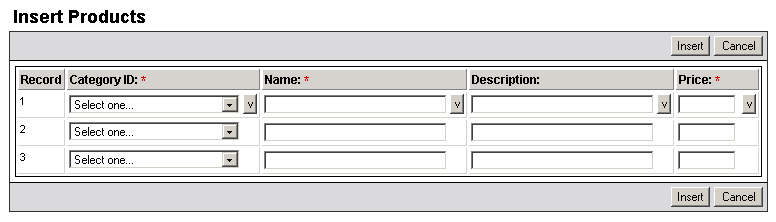
The multiple insert operation is in fact a series of single insert operations. Only one STARTER and one END triggers can exist for the multiple insert or update, but separate BEFORE or AFTER triggers can exist for each single operation that belongs to the multiple operation. (e.g. the Form Validation trigger is applied on each transaction, stopping only the ones that do not comply the validation rules).
If one of the insert/update transactions fails for whatever reason, it is the only one that is stopped, the other transactions, either before or after the failure will be executed correctly, as you can see in the example below:
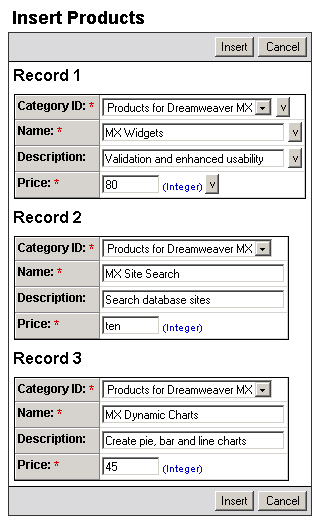
In the multiple insert below (3 different products
at the same time), the second one does not have a numeric entry for the
price and the form validation is applied:
When the Insert
button is pressed, the page will display that an error occurred, but also
that some of the operations were executed:
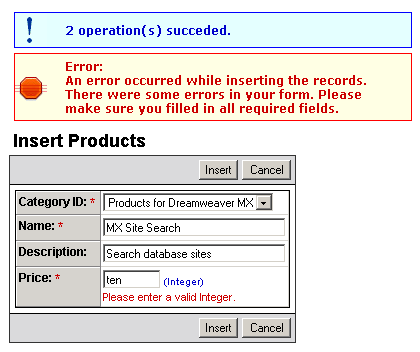
The first and third products were successfully inserted into the table,
but the second one had an incorrect price and thus that particular insert
operation was stopped. Once the wrong data is corrected in the form and
the Insert button is pressed, the record
will be added to the table as well.