
|
|
|
|
To create a logout link on your site and clean all session variables, you should apply the Logout User server behavior from the Application panel -> Server Behaviors -> MX Kollection -> User Login. This server behavior should be applied to both company/index and user/index files.
First, open the company/index
page and create a new paragraph below the existing links. Place the cursor
in the new paragraph, enter the Logout
text, and apply the Logout User server behavior:
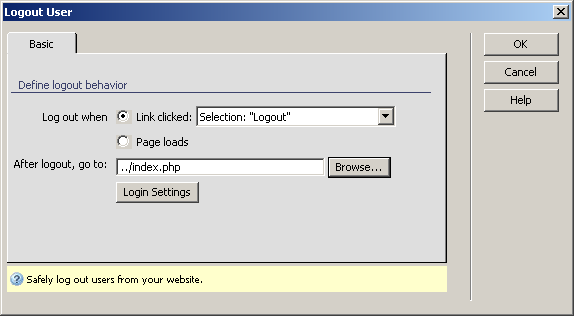
Check the Link clicked radio button. For the redirect page, use the Browse button to select the main index.php file.
Save the page. When a logged-in user will click the link, its session data will be deleted, and he will be redirected to the site index page.
Follow the same procedure for the user/index page.
Note: If you use this server behavior on the ColdFusion server model, a file named Application.cfm will be automatically generated in the site root folder. Do not delete this file, as it contains settings related to session variables used by the server behavior and the current application. If you remove this file or modify it, application pages that use sessions will not function properly.