
|
|
|
|
To build a secure registration process, you must eliminate the risk that users get more rights than they should. And what better, and easier way to get more rights than to alter the access level. This is possible when using hidden fields to feed the insert transaction the active status and level. One may save the page on the local hard-drive, edit it so that an administrator level is passed to the insert operation.
To prevent this, you can use the Add Transaction Fields server behavior. This server behavior works with the fields that are not a part of the main transaction (e.g. the fields you delete from the grid, or that don't even show up due to the user interface persistence), giving them a value and adding them to the actual SQL query.
For the company registration case, you should use this server behavior to set the active status and the level. After completing the User Registration Wizard, apply this server behavior as follows:
Open the dialog box from the Server Behaviors tab -> MX Kollection -> Forms -> Advanced -> Add Transaction Fields.
Press the Plus (+) button on top of the grid, and select the active_usr and level_usr fields from the list of unused fields. Hit the OK button to add them to the grid.
Configure each field, by selecting it in the grid, and changing its options from the controls below. Set them both to be submitted as Numeric (they are numbers after all).
Also, set the values for each of them to 1. For
the active_usr field, this means the account
is active, and for the level_usr, it shows
that the user is a company:
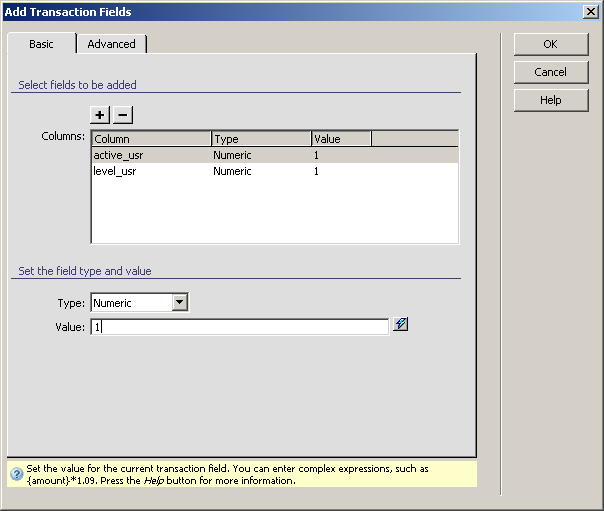
When you click the OK button, the two fields will be taken into account when the transaction executes, and they cannot be altered.
Now that you've securely passed the last parameters of the registration, go on and test the page.
The same secure registration process will be used for the user registration as well, but the values or the level and active fields will be set to 0, instead of 1. This will ensure that users have the correct level, and that their accounts are not active.