
|
|
|
|
In this page you will add an additional check before a topic is deleted. The check is designed to prevent a topic from being deleted if it has sub-topics underneath it.
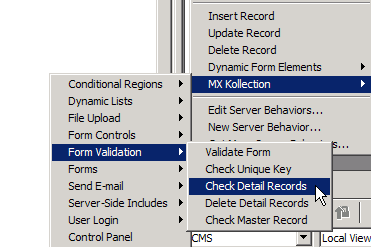
Open the page containing the NeXTensio
Form, detail_art, and add the Check
Detail Records behavior from the Server
Behaviors menu:
When the Check Detail Records interface opens,
configure the fields as follows:
· Detail
table: page_pag
· Foreign
Key: idpag_pag (self foreign key)
· Error
Message: type a meaningful error message in the text area.
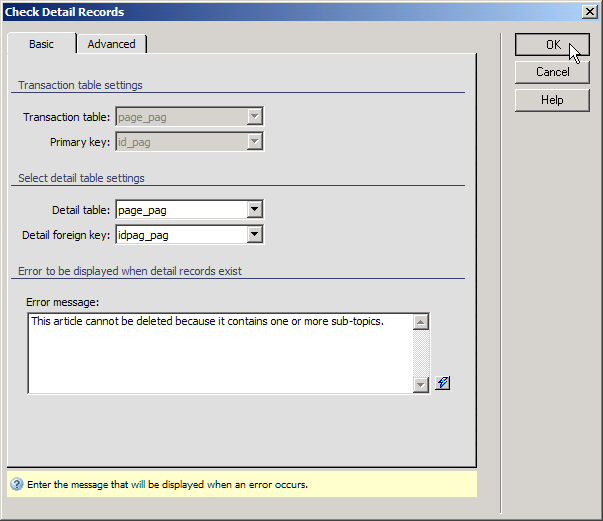
Click the OK button. The server behavior will
then be added to the page. Save the page and upload it to the server.
You can test the page by logging in to the site, and going to the list_art page in the admin section. Try to delete
a record, like IT Conferences, which contains sub-articles:
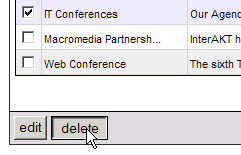
After clicking delete an error message (the one you defined) should
appear on the detail_art page:

With the Check Detail Records behavior,
the only way to delete both an article and it's sub-articles is to individually
delete the sub-articles first, then delete the main article. If you decide
this is too much of an inconvenience, you can delete the Check
Detail Records behavior, and add Delete
Detail Records one instead. It is configured in the same way, except
without an error message field.
In the next chapter, you will
improve your Content Management System by adding advanced features, including
auto-archiving old articles, creating rich-text content using the KTML,
and search engine optimization.