
|
|
|
|
You can update multiple records at the same time by using NeXTensio lists and forms.
Let's consider the following NeXTensio
list. The skin used is the aqua one, and
the buttons and navigation bar are not duplicated. The rows are ordered
ascending by name:
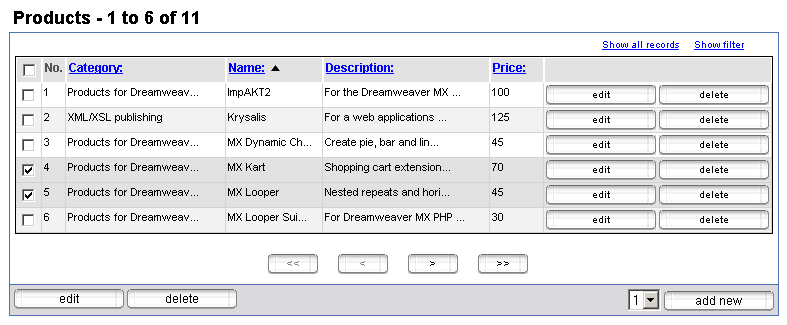
A multiple update operation requires at least two records to be updated.
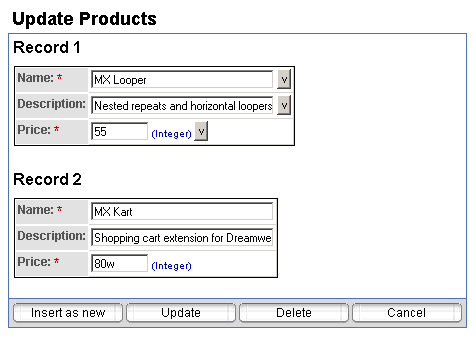
Let's say that the two records selected above are to be modified. After
clicking the edit button in the left lower
corner of the list, the associated NeXTensio
form opens:
If you click the Update button, you will
get the message that only one update operation succeeded, while the other
one encountered an error (a validation rule was not respected):
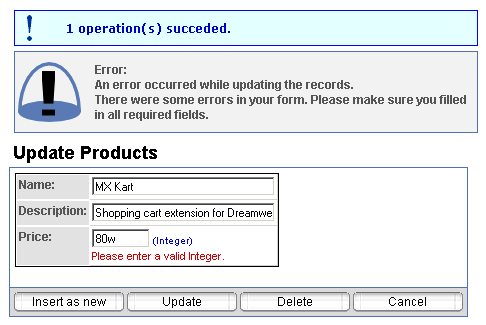
This is a great advantage since you don't have to enter again the updated
information for all the records, but only for the one with the error.