Update includes folder
This menu of the
enables the user to update the 'includes' files of the currently active
site. The interface consists of a table with four columns ("Product
name", "Installed version", "Site version", and
"Update site version") that lists the installed products on
the local computer and the products that are used in the current site
(with their corresponding version).
The command will check if the installed version of a product is newer
than the one used in the site, and it will update it if the user chooses
to:
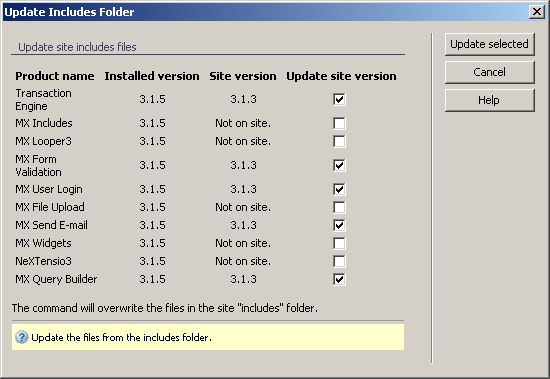
To set the dialog box options, follow the next steps:
- Analyze the first three columns of the table and,
if the installed version of a product is newer than the site version (compare
the two versions by following the table rows), the checkbox on the fourth
column is automatically checked. If you want to update all the products,
check the rest of the checkboxes (for the products that are not on your
site). All the checked products will be updated.
- The three buttons on the right of the interface offer
you the next functionalities:
· Use the
button to have the 'includes'
files updated (the files corresponding to the checked boxes in the fourth
column of the table). The updating takes place by overwriting the versions
used in the site with the ones from the local computer.
· Click
to exit without updating
the 'includes' folder.
· The
button takes you to this
help page.
When you update the includes
folder, the resource files and the configuration files (the settings chosen
in the )
are not overwritten, so you will not lose your current resources (labels,
messages etc) and settings.
