Language settings
Since the includes
internationalization support, this menu of the enables the user to change the language resource
file of the currently active site:
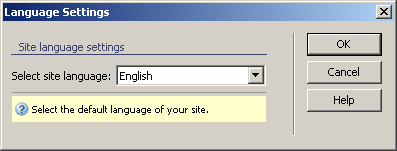
To set the dialog box options, follow the next steps:
- In the Select site language
drop-down menu select the current site language from available languages:
English, French, Italian, German, Spanish, Danish, Dutch, Finnish, Norwegian,
Portuguese, Swedish
- The three buttons on the right of the interface offer
you the next functionalities:
· Click when you are done configuring the dialog
box.
· Click to exit without changing the
language resource files.
· The button takes you to this help page.
When switching the language for your site, only the following elements
will change:
- General and field error messages - the error messages
displayed on top of the page, as well as those that are displayed next
to each field.
- Validation hints (the text that is displayed next
to a filed that has a validation rule applied)

Note: when performing an update of , the resources files will not be overwritten. If you
are missing newly added resources, and do not have any important customizations
made (eg. custom error messages), the easiest way to update these files
is to switch the site language from your current one to another (eg. from
English to French- which will overwrite the existing English resources
with the new, but French ones), and another switch back to the original
(eg. from French back to English). The new resources will be copied onto
your site's resources folder.
Note: If you want to translate messages into your language, you will have to edit the
files that are located in your site folder, in includes/resources. Each
of the files contains the string messages used by components (eg. the tng.res.php
file contains the messages used by the transaction engine, while wdg.res.php contains the error messages for the ). Make sure that the language you need
doesn't already exist before starting work. And when you're done, zip
the files (it's also good for a backup) and send them to .
This way, your work might make it in the next release.
