Depending on how the Restricted Textarea
has been configured, it may or may not impact the user visually. However,
the behavior is altered from the normal HTML text area in all cases.
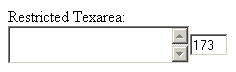
If the Show character count option has
been enabled in the control's user interface, the number of characters
left to enter in the text area will be displayed next to the element:
The behavior of the control is as follows:
Each time a new character is typed, the character
counter is decreased. When an existing character is deleted, the counter
will increase its value.
When the maximum number of characters has been reached,
the character counter turns its border red, and optionally, if set in
the configuration dialog, a message is displayed.
If the user copies & pastes to enter content,
and its number of characters is bigger than the allowed limit, the content
will be truncated to fit the text area, and the limit reached message
is displayed.