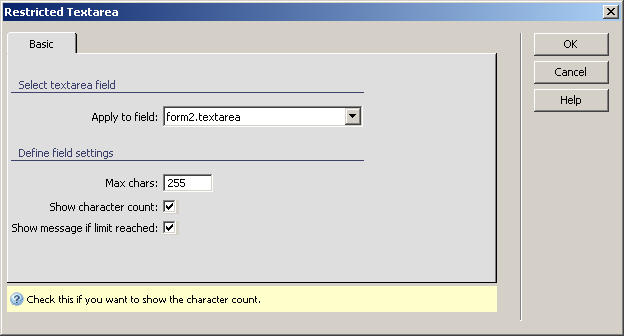
A server behavior is a reusable component for server-side development.
They add blocks of code to your pages for accomplishing specific tasks.
Dreamweaver comes with several default server behaviors and the InterAKT
extensions add many more to this list.
Configure Restricted Textarea
The Restricted Textareaserver
behavior
allows the web developers to include a restricted text area in their site
pages. Before applying it, there must be a text area added in the Dreamweaver page.
This server behavior is accessible from the Application
panel, Server Behaviors -> + -> MX Kollection
-> Form Controls -> Restricted Textarea.
The user interface has only one tab. Directions about its correct configuration
are given below.
To set the dialog box options, follow the next steps:
In the Apply
to field drop-down menu select the text field on which to
apply the server behavior.
In the Max
chars text box enter the maximum number of characters allowed
in the text area. The default value is 255.
The Show
character count checkbox displays how many characters can
still be typed.
The Show
message if limit reached checkbox notifies you that you
reached the maximum number of characters, and that you cannot type any
more text.
The three buttons on the right of the interface offer
you the next functionalities:
· Click OK when you are done configuring the server behavior.
· Click Cancel to exit without applying the new settings.
· The Help button opens this help page.