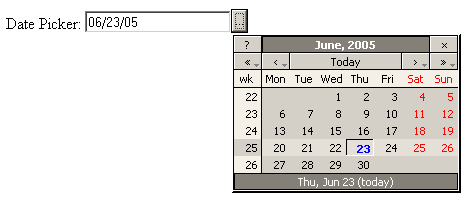
The Date Picker allows the user to select
the date from a calendar, rather than manually entering the date. It enhances
the regular text field, by providing a supplemental button that opens
a calendar. As it is created in Java Script, only compliant browsers will
be able to use its features.
The Date Picker behavior and look in the
browser are as follows:
In a Java Script compliant browser, a button appears
beside the text field. When the button is pressed, it will display the
calendar:
When a date is selected from the calendar, it will
be inserted in the text field, and the calendar will close. you can manually
alter the date, or re-open the calendar to choose another one.
If the user decides to manually enter the date in
the text field, then it will allow and enforce only the date format specified
in the configuration.