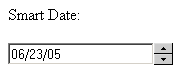
The Smart Date widget is designed to help
prevent incorrectly formatted dates when submitting forms. It is applied
on a regular text field, and alters its behavior as follows:
If the browser on which the page is viewed supports Java Script, two buttons
will be displayed next to the regular text field, allowing you to increment
or decrement the value of the currently selected group (date, month or
year).
The increment and decrement operation can be performed
with the help of the + and - keys. Just select the group to change, and
either press the keys, or buttons. If you hold the key/button pressed
for more than 5 seconds, instead of one unit, it will change the value
for the group by 10.
When using the increment/decrement feature, when
the current group has reached its limit (e.g. end of the day or month),
the next affected group will be changed.
The existence of the increment and decrement buttons
is determined by the way the widget has been configured.
When you enter the date in the text field, if you
do not respect the format, it will automatically convert the input into
a valid format.