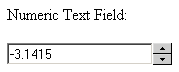
When the Numeric Text Field widget is
applied on a form text field element, it will change its behavior and
the way it looks, as follows:
If the browser supports Java Script, two buttons will be displayed next
to the text field, allowing you to increment or decrement the value displayed.
The text field allows only numeric input; if you
enter a character that isn't numeric, or the decimal and negative signs,
it will be ignored.
The negative sign can only be entered as the first
character. If it is placed anywhere else, it will be treated as any other
bad input.
The decimal separator can only be placed once. If
you try entering it a second time, it will be treated as bad input, and
ignored.
The increment and decrement buttons have different
behavior, based on how long they have been pressed: in the first 5 seconds,
the buttons will increment or decrement the value in the text field by
one. If they are held for more than 5 seconds, they will automatically
add or subtract 10 to the value in the text field. The same behavior is
achieved when pressing the + and - buttons on your keyboard.
If the browser does not support Java Script, or has
it disabled, the text field will behave as a regular one.