A server behavior is a reusable component for server-side development.
They add blocks of code to your pages for accomplishing specific tasks.
Dreamweaver comes with several default server behaviors and the InterAKT
extensions add many more to this list.
Configure Numeric Text Field
The Numeric Text Fieldserver
behavior
allows the web developers to include a numeric text field (the input can
only consist of digits) in their site pages. Before applying it, there
must be a text field added in the Dreamweaver
page.
This server behavior is accessible from the Application
panel, Server Behaviors -> + -> MX Kollection
-> Form Controls -> Numeric Text Field.
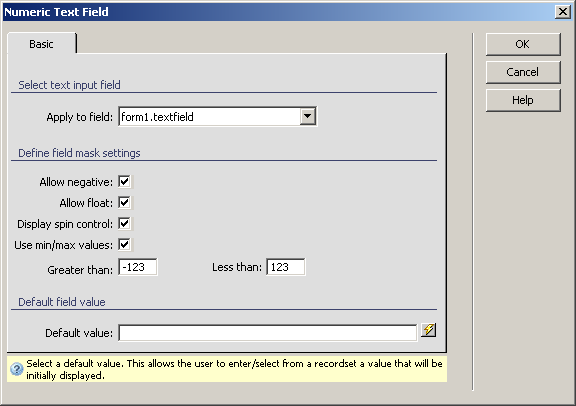
The user interface has only one tab. Directions about its correct configuration
are given below.
To set the dialog box options, follow the next steps:
In the Apply
to field drop-down menu select the text field on which to
apply the server behavior.
The Allow
negative checkbox enables the option of entering negative
numbers. The minus ("-") character will be accepted at the beginning
of the text field, when needed.
The Allow
float checkbox enables the option of entering rational numbers.
The period (".") character will be accepted once in the text
field.
The Display
spin control checkbox allows the appearance of the increment/decrement
controls when the widget is loaded in the browser.
The Use
min/max value checkbox enables the two text boxes below
it, when checked.
In the Greater than
text box enter the minimum value for the numeric input. When a number
lower than the minimum value is entered, it will be replaced with the
minimum value.
In the Less than text
box enter the maximum value for the numeric input. When a number greater
than the maximum value is entered, it will be replaced with maximum value.
In the Default
value text box enter a starting value for the numeric text
field. You can also select it from one of the available recordsets in
your page by using the lightning icon on the right.
The three buttons on the right of the interface offer
you the next functionalities:
· Click OK when you are done configuring the server behavior.
· Click Cancel to exit without applying the new settings.
· The Help button opens this help page.