
|
|
|
|
In this 'how to' tutorial you will learn how to send a page section by e-mail to multiple recipients retrieved from a database table. The use of this lies in the possibility of sending dynamic data and HTML content to multiple recipients that have their e-mail addresses into a database table.
Note: You cannot use the Send Page Section by E-mail server behavior to implement a Newsletter sending application, as after a few successful e-mail messages, the server will time out. If retrying the send, the same recipients will receive the message.
The database structure used in this tutorial is the same as the one used in the Content Management System tutorial. To recreate it, use the scripts included in the \tutorials\Content Management System\db\ folder. The database structure is as shown in the image below:
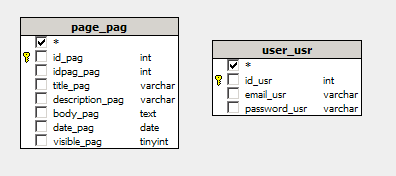
Note: The database diagram in the image above was built with MX Query Builder (also referred as QuB) to better illustrate the database structure. You do not need to build it in order to complete this 'how to' tutorial.
For this tutorial, you will create three pages:
index - the site index, contains a link to the page containing the Send E-mail trigger.
mail - the page containing the data to send by e-mail, and the actual Send E-mail trigger.
thankyou.htm - contains a thank you message.
To quickly create the site's files, simply unzip the package corresponding to your server model from the \tutorials\_HOW_TO\Send page to multiple persons\ folder in your local site root.
Before starting to work on the site's pages, you must create a Dreamweaver database connection:

In the next section of the tutorial you will create the site's content: a dynamic table which will list article titles and short description, which will be sent to all users retrieved by a recordset.