
|
|
|
|
Aside from the two ways of reporting errors, Development and Production, MX Kollection 3 allows the creation of logs for all errors. With the Debugging mode entry in the InterAKT Control Panel, you can decide how to maintain these logs: you can either write into a file whenever an error is raised, or receive an e-mail every time an error occurs.
A dialog box similar to the image below will be displayed:
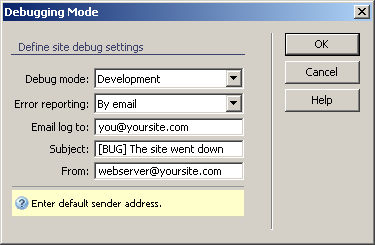
When using the log to file option, a file called readme.txt is generated in the includes/tng/logs folder, and the appropriate setting is set in KT_config.inc.php. When you need to check the errors, simply open the file (or download it from the server using what method of file transfer you prefer).
For instructions on configuring this dialog box, see Debugging
mode.