
|
|
|
|
The Alias field is generally used when a variable needs to be created
in the query. For example, if your query takes a sum of all the department
budgets, a default alias (variable) will be created to store that number.

An alias is not required unless a Grouping option is chosen. When a Grouping option is selected, then MX Query Builder generates one by default. If you would prefer to have your own alias name, just delete the default and type the new name instead.
The Output checkbox indicates if a tables column will be included in the final recordset or not. You could use a certain table column just to define a query condition, but not include that column in the query results. For instance, you may want to display the names of the employees that have a salary greater than $1,000. In this query, the salary_emp column would be used just to define a condition, but would not be included in the output of the recordset.

The generated query looks like this:
SELECT employees_emp.name_emp
FROM employees_emp
WHERE employees_emp.salary_emp>1000
Please notice that the salary_emp column is not included in the SELECT clause, but only appears in the WHERE clause.
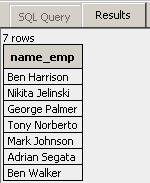
The Results tab confirms this:
In the next topic you will see how
to use the Sort option.